Your Job Post Edits Did Not Update In LinkedIn
If a job is edited in Hirebridge, you may still see outdated information in LinkedIn. This is because LinkedIn caches the information based on the URL and will not retrieve the metadata from the page with every share. It may take days for the cache to expire.
Fortunately, there is a tool designed for the purpose of previewing your URL that happens to refresh the cache when you use it.
You can, perhaps, use the URL from the address bar of the job details page, but sometimes there is a hashtag at the end of the URL that is not there when you share it. So you may need to remove it or, better, yet, just get the URL exactly as it was passed to LinkedIn (or at least do this if removing the hashtag still doesn’t help).
Get Shared URL
- On the job details page go ahead and Share on LinkedIn
- In the window that opens, copy the URL from the address bar:
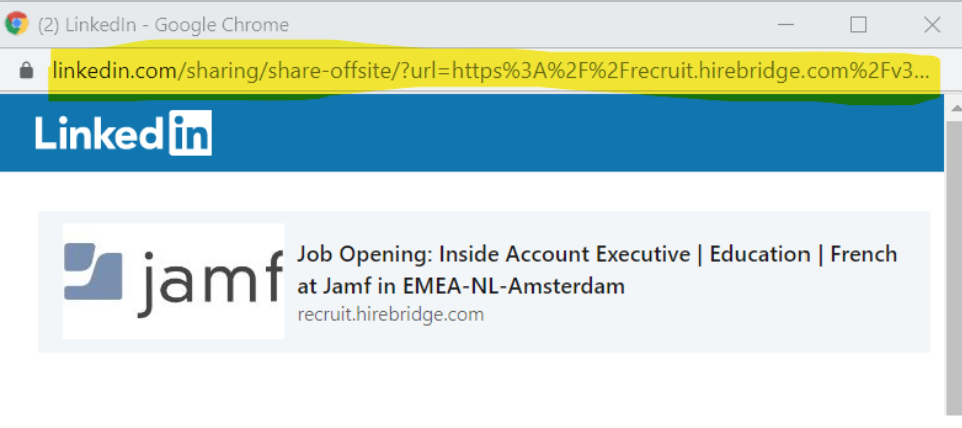
- Paste the URL into Notepad or any other editor and then edit it so you only have the part after “url=”
- Copy it your clipboard

- Go to urldecoder.org and paste the link into the box for the text to decode and click Decode
- The decode text will now appear in the text box below the Decode button. Copy it to the clipboard
LinkedIn Preview/Cache Clear
- Go to https://www.linkedin.com/post-inspector/
- Paste your URL into the text box and click Inspect
That’s it. Once you see the preview it should contain the latest information and the cache should be cleared. Try sharing the job details page again. It should match what you saw in Post Inspector (that is, the latest).