The Time To Fill metric is measured by the number of days between the creation or publication of a job requisition and the date that the requisition is closed and marked as filled.
Measuring How Long The Job Was Actively Being Worked
Accurately determining how many days that your team spent actively working the requisition is a key metric that can help shape your teams direction.
Hirebridge measures the days on hold, so that when you ultimately close the requisition, Hirebridge will calculate both the GROSS or total days the job was open, and the NET or days active, which is the total days minus the days on hold.
Days On Hold
Days a requisition is on hold, ie. when active recruitment stops (in Hirebridge, candidates cannot apply nor be added to job requisitions when they are in the ON HOLD status) are measured and can be used to more accurately gauge and measure time to fill.
Automatically Placing Requisition On Hold At Offer Acceptance
Some organizations use the date that an offer was accepted as a metric in determining Time To Fill. When an offer is accepted, the job requisition can automatically be placed ON HOLD.
Reqs Filled
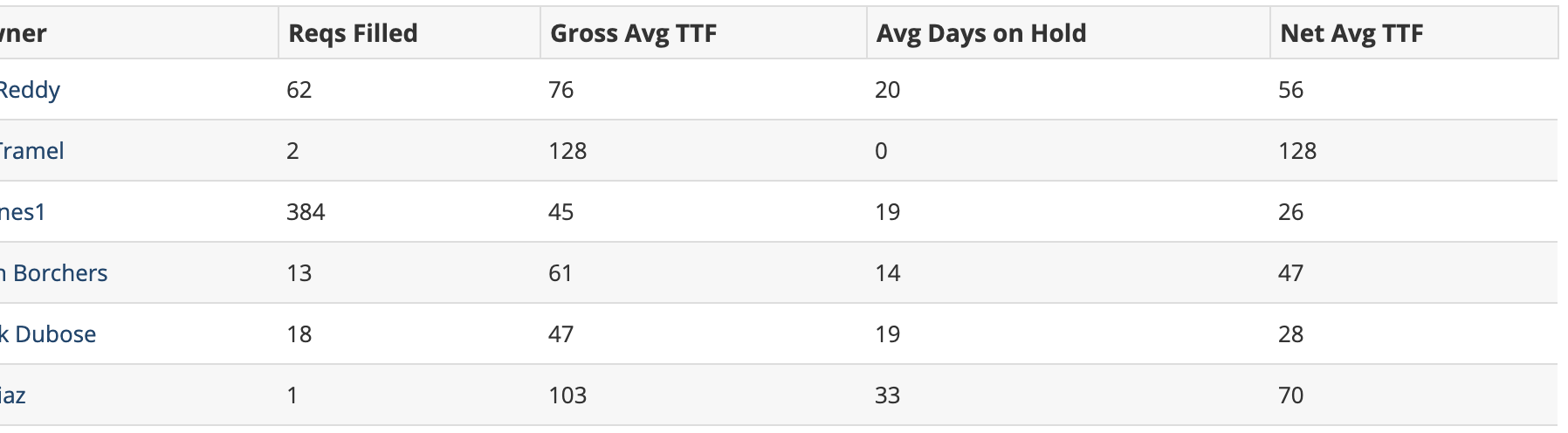
The Reqs Filled column counts requisitions that were closed during the date range selected, and marked as filled.
Requisitions that are closed and not marked as filled will not appear in the list.
Gross Avg TTF
Gross Average Time To Fill metric calculates the days from first publication or creation of the requisition until the closed and filled date.
Avg Days On Hold
Average Days On Hold calculates the average days that a requisition was on hold. Any part of a day that the requisition was on hold will count against the Days On Hold metric.
Net Avg TTF
Net Average Time To Fill is calculated by subtracting the days on hold from gross average time to fill column, which measures the days from first publication or creation until the requisition close/fill date
Drill Down For More Details
The RECRUITER COLUMN listed in the report is a clickable link, which will bring you to a list of all of the job requisitions that were counted in the REQS FILLED column. If you do not see a requisition that you believe should be in the list:
- Locate the requisition from the Jobs Overview tab and review the history. You want to make certain that the job was closed, marked as filled, and has the correct close date.