This article will cover how to use the Advanced Candidate Search
- To access the advanced search select "Candidates" tab in the navigation bar. From the drop-down list select "Advanced Search".

- This will now take you to the "Advanced Search" page
- First, select if you would like to search for candidates or prospects
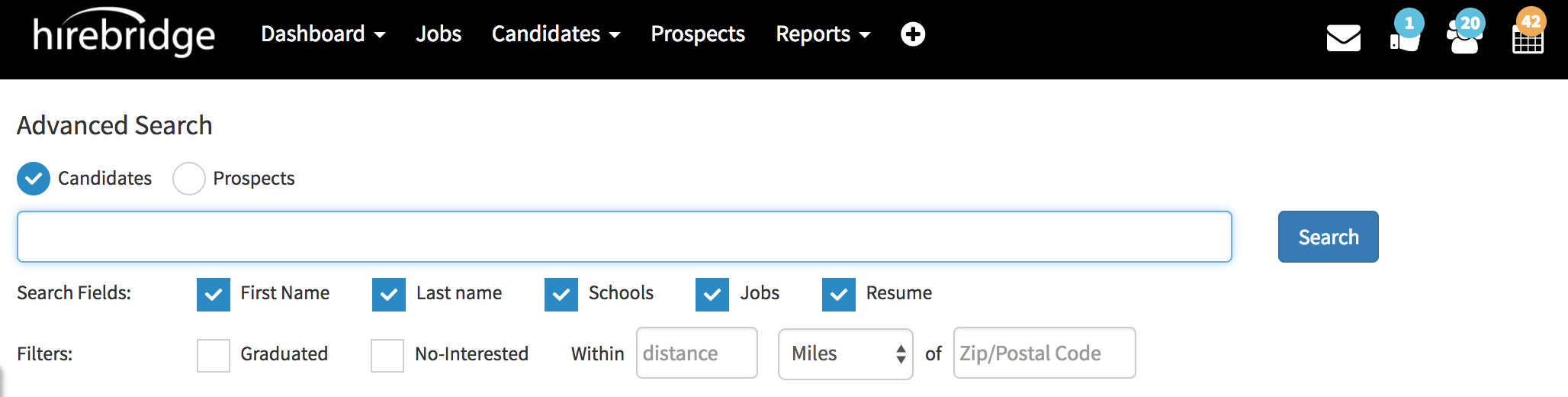
- In the text box below you are able to type keywords to search for.
Search Fields:
- First Name - Search keywords within the first name field
- Last Name - Search keywords within the last name field
- Schools - Search keywords within the school's field.
- Jobs - Search keywords within jobs field.
- Resume - Search for keywords within resumes.
Filters:
- Graduated - Filter graduated candidates
- No-Interested - Filter through no interested candidates
- Within - Within a certain distance