This article will cover how to invite a prospect to apply for a position
- The first step to inviting a prospect to apply is to find a prospect.
- In the navigation bar on the top select the "Prospects" tab.
- The page will load and show a list of Prospect Folders. (as shown below)
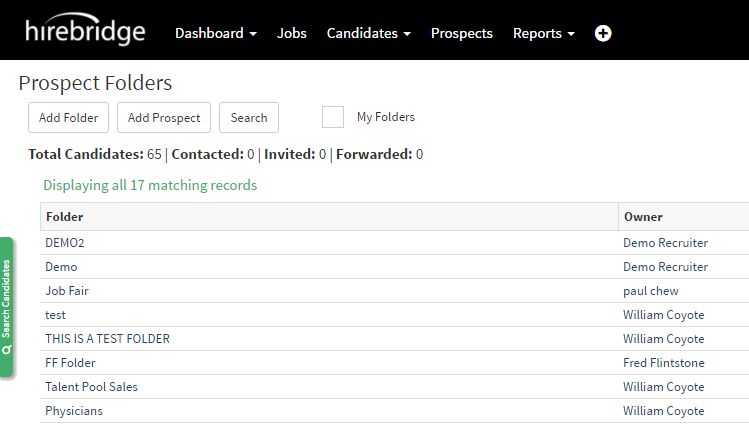
- Once you have selected the folder it will show all the prospects for that specific folder.
- For this example, we will go into "Talent Pool Sales"

- In this folder we see a specific prospect we want to invite to apply (Philpstein, Bacardi)
- Next we will select on that prospect and it will open their prospect profile.
- Once in the prospect profile you would select the "Invite to Apply" button.

- This will take you to the invite to apply page where you can send the candidate a custom message or choose from a template in the drop-down menu.
- On this page you will also need to select which requisition you would want the prospect to apply to in the drop-down list.
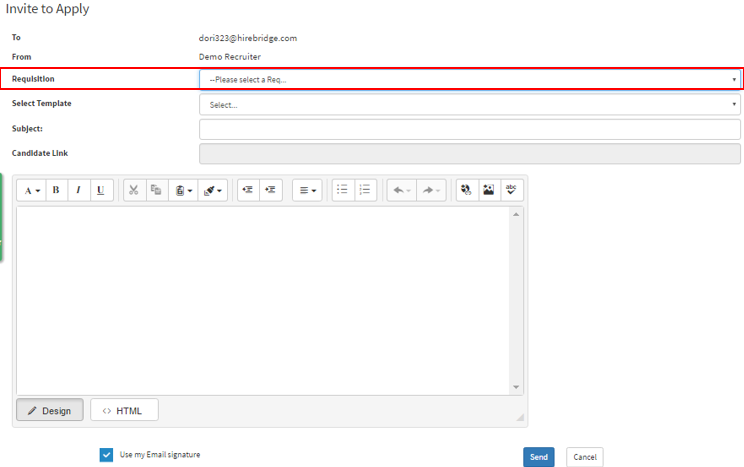
- Once you are satisfied on which job requisition the prospect is being sent to apply to and the message you will be sending the prospect you will now select the blue "send" button.
- The prospect will now be sent a job apply invitation via email to apply for that specific job.