Setting Your Default Landing Page
You can customize which page you land on after logging in. This helps streamline your workflow by taking you directly to the area of the platform that matters most to you.
How to Set Your Default Landing Page
1. Click your name in the top right corner of the screen to open a drop-down menu.

2. Select Preferences from the menu.
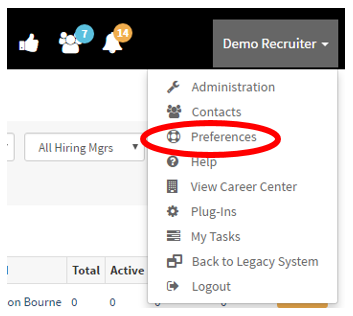
-
You’ll be directed to the User Preferences page.
-
Click on the Defaults tab near the top of the page.
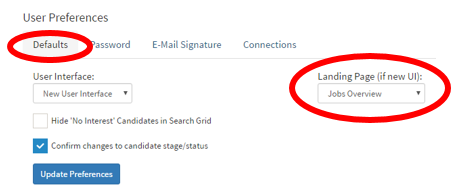
5. Locate the Landing Page drop-down menu (outlined on the right side).
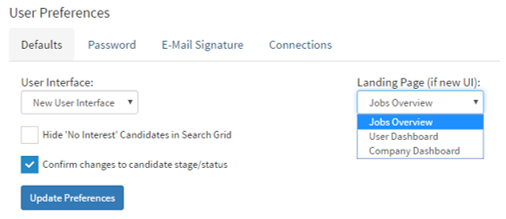
-
Choose your preferred landing page:
-
Jobs Overview
-
User Dashboard
-
Company Dashboard
-
-
Click the Update Preferences button to save your changes.
Once saved, the system will direct you to your selected page every time you log in.