Navigation Bar Indicators
This section will define what each indicator means.
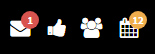
- Envelope - This icon shows how many messages are waiting.
- Thumbs Up – This icon lets you know if you have any offers and requisitions you would need to approve.
(Numbers next to the thumb Icon mean how many job requisitions or offers you need to approve.)
- Multiple People – This will display new candidates and will offer quick access to recent candidates within 7,30,90 days, Month to date, Year to Date, and Recently Viewed.
(Numbers next to the multiple people icon mean how many new candidates since last login.)
- Calendar Icon – This Icon lets you know of tasks that need to be completed such as interviews.
(Numbers next to the bell Icon mean how many tasks such as interviews/tasks that need to be completed.)

- The plus sign that is circled in red above allows you to add a candidate, prospect, and jobs.