Change Candidate Status
This article will cover how to change the candidate’s status.
The example will use is changing a candidate from Active to Hired.
- First, find a candidate profile.
- Once in the candidate profile click next to the status.
- A drop-down menu should appear giving a list of statuses to choose from.
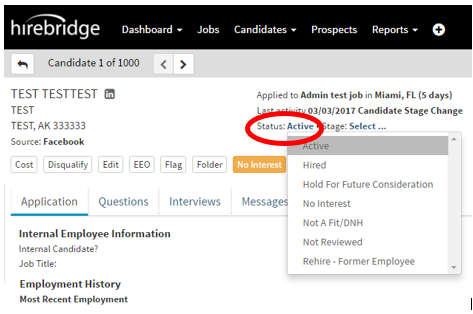
- For this example, we will select “Hired”
- After Hired is selected a pop-up should appear confirming that you want to change the status.
- In this case, we would click the blue “Yes” button.

After clicking “Yes” it will send you to the “Hire Candidate Editor” page. This is where you confirm the candidate’s information.

- Once you have reviewed the candidate’s information, verify the status and select save.

- Once you clicked save, the candidate status is now hired.
