How to access the Job Requisition link.
This tutorial will cover how to get the link for a Job Requisition
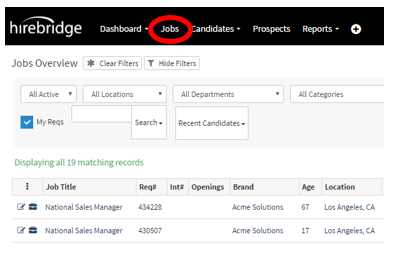
- Select the Jobs tab in the navigation bar.
- This will show you a list of available requisitions.
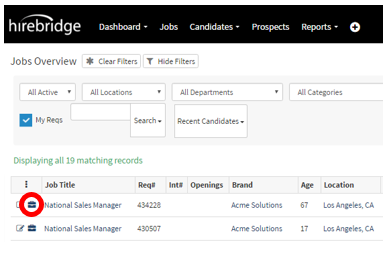
- Next to the Job title, click on the suitcase icon.
- You will now be on that specific Job Requisition page.
- Click on the Links tab, this is where you can find the link for that specific job and share it.
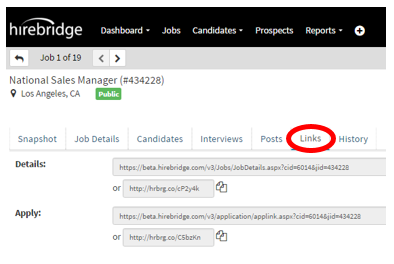
- Details Link – This link sends you to the job description page.
- Apply Link – This link sends you straight to the application.
This page also will give you the intranet link for internal applications.
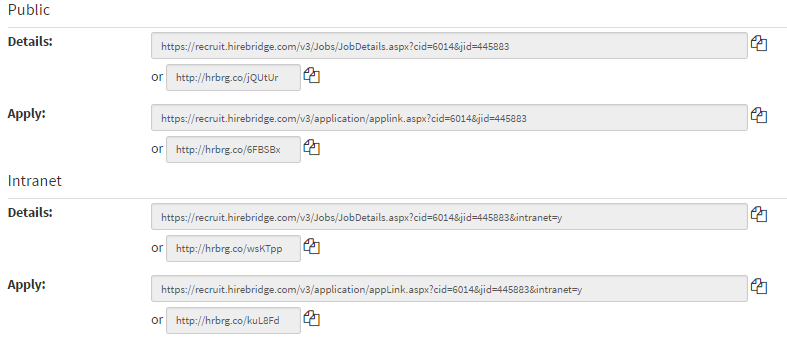
- Double click on the link or select all, then you are able to copy and paste the link into either an address bar or an email.
Email Apply
- Applicant (Apply): Provides an email address in which candidates can submit in their resumes via email. The resume is parsed and then a profile is created for the candidate.
- Company (Import): Used for recruiters and hiring managers that want to email resumes into the system.
- Check the Send confirmation to candidate box will send a confirmation to the candidates once their resume has been successfully submitted.

-------------------------------------------------------------------